
What Is MCP? The Model Context Protocol, Explained

The Model Context Protocol (MCP) comes up constantly in conversations. Usually alongside confusion about what it does, what it doesn't do, and how it compares to a normal web API. Here we're focused on MCP: how it works, when to use it, when not to, and why the MCP Apps extension matters for a high-quality experience.
What Is the Model Context Protocol (MCP)?
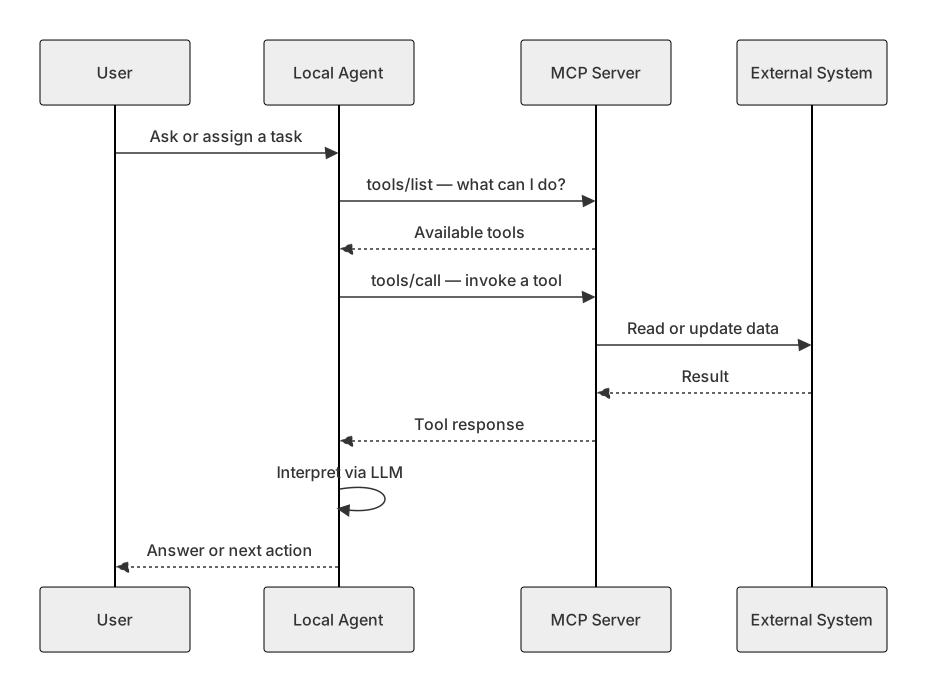
At its simplest, MCP is a way for your local agent of choice: Claude, Cursor, Gemini, ChatGPT, Codex, whatever you're running, to access information: read it, update it, act on it.
It provides a somewhat standard integration layer between AI clients and external systems. I say somewhat because it is fundamentally not the same as a standard web API. The underlying technology that leverages it is non-deterministic. You're not calling a fixed endpoint and getting a guaranteed schema back every time. You're giving an agent a way to discover and invoke capabilities, and then trusting that agent to interpret the results.
💡 MCP standardizes the connection. It does not standardize the outcome. Your agent is part of the integration and that non-deterministic agent is the part folks often gloss over.
Official framing from the spec: MCP is an open protocol for connecting AI applications to data sources, tools, and workflows. Think of it like a USB-C port for AI. See the MCP getting started docs for the canonical overview.
How MCP works: "What can I do?"
The basic flow:
- Your agent connects to an MCP server.
- It calls something equivalent to: "Hey, what am I allowed to do?"
- The server responds with a list of tools named capabilities the agent can invoke.
- Your agent picks a tool, calls it, gets a response, and figures out what to do next.
That's it at the protocol level.
The sous chef analogy
Imagine a sous chef that's your local agent. They're responsible for getting food prepared. They connect to a Chef Helper MCP server.
.svg)
Step 1: The sous chef calls Chef Helper: "What can I do?"
Chef Helper responds with tools. In this example, two:
search_for_recipeget_recipe
That's all you get back. A list of things you're allowed to do.
Step 2: The sous chef says: "I'd like a recipe for a nice French cuisine meal."
They call search_for_recipe. They might get back a list of IDs, maybe some metadata but what you get back is not necessarily consistent. One time the list looks one way; another time it looks different. That's inherent to the protocol. You have a tool; it responds with something.
🔌 This is also the power of the protocol. It leverages the capabilities of an LLM to translate these MCP integrations into something you can do.
Step 3: The sous chef says: "Give me that recipe."
They call get_recipe. They get a recipe back.
Now the hard part: You're relying on your sous chef's innate ability to read that recipe and execute it. Most of the time that works. Other times, maybe that sous chef wasn't trained in the cuisine for that recipe and they have no idea how to do the work.
💡MCP on its own, just having access to MCP, is insufficient for serious work in fraud and AML. The protocol connects your agent to a server. It doesn't guarantee the agent knows what to do with compliance data, alert schemas, or investigation workflows.
In our world, you might connect to an MCP server and ask "What fraud typologies do you support?" or "What transaction monitoring do you have by default?" You're dependent on the server having the right tools and your local agent (ChatGPT, Gemini, Claude, whatever) actually understanding the response.
🤓 Due to the underlying training data, many LLMs are very good at this nebulous work. Well, at least they’ll appear to be good at the work. This is why it’s very important the MCP integration for Fraud and AML work include additional context, to help the LLM and local agent avoid hallucinations.
Skills, plugins, and why I'm skeptical of skill packs + MCP
Some teams embed skill packs (or plugins) alongside MCP: extra files that give your agent context about when, how, and why to use a server. Claude's skills system shows how this can work.
The idea: MCP alone isn't enough, so you add instructions, markdown files, configs, rules, that teach the agent how to use the tools.
.svg)
That can work. But when the MCP provider ships those skills:
- You now have more than the MCP server. Context files that need to be installed, managed, and updated like any other software.
- The vendor can update their server, but can't force you to update the skills on your machine. Those go stale.
- You're taking on higher operational risk: MCP + local files + version drift.
⚠️ I discourage skill packs from MCP providers. If you need skills, own them yourself or build tools self-explanatory enough that the agent doesn't need a custom instruction manual.
The context window problem
Every MCP server you connect consumes part of your agent's context budget.
Rough mental model: maybe your local AI can keep track of ~1,000 "things" at once. Each MCP might eat 10–50 of those slots just from listing its tools, even if you never use them. Connect 10 or 20 MCPs and you've burned a huge chunk of cognitive load before doing real work.
We’ve completely rebuilt Unit21 around an AI first mindset. It’s this first hand knowledge and operational flow that gives us such conviction on protecting your local agent’s context windows.
🔥 A bloated MCP is worse than no MCP. If a server pollutes the context window with hundreds of poorly named, overlapping tools, you'll rip it out and you should.
Authentication and authorization: the part the spec doesn't solve for you
Everything above assumes tools just work. In fraud and AML, that's not acceptable. Those tools need authentication and authorization. The spec has ideas for this, and even recommends it, however, it’s optional. 😬 For a responsible provider, NO, it’s not optional.
You want to review an alert via MCP. Who is asking?
- Is it the agent's permission?
- Is it the human driving the agent?
- Is the agent fully autonomous running with whatever credentials were wired up at install time?
Real scenario: alerts move through queues. At any moment it may not be valid for the same person to see details on a given alert maybe it moved to a more restricted queue. MCP doesn't solve that. You have to.
OAuth: the right default
If you're building an MCP server, you should always have auth in your MCP layer. As a customer, you probably don't want servers that require no authentication. That's a sign your data isn’t protected.
The pattern in serious integrations today: OAuth. Same idea as "Log in with Google." When you approve that flow, you're saying: this AI agent can act on my behalf on this platform.
When your agent updates an alert, pulls case data, or changes a disposition, the backend should see it as you, not some anonymous bot.
🔑 In compliance you need to know who made updates, when, and what changed. OAuth ties the agent to a person. One AI working a whole queue? Fine, but provision credentials explicitly. Don't let "installed once, runs forever" be your security model.
MCP vs web APIs: task-focused, not data-dump-focused
Most web APIs are not task-focused. They don't say "go close my alert with this disposition." You hit multiple endpoints or call a generic update_alert and compose the workflow yourself.
MCP tools are closer to remote procedure calls (RPCs). Intent-based: more descriptive about the action you're taking. MCP actions should look different from your normal composable web interface.
Web API (typical):
GET /alerts/123 → PATCH /alerts/123 → POST /cases → PATCH /alerts/123/disposition
MCP (better):
review_alert → summarize_investigation → close_with_disposition
Don't naively map every API endpoint to a tool
At Unit21 we have hundreds of API endpoints. Map each one to its own MCP tool and you'll overwhelm most agents — 100–500 context slots just listing tools on connect. Unusable.
Better approach: design tools around use cases, not raw data access.
MCP Apps: why base MCP isn't enough (and the browser analogy)
If you're using Claude, ChatGPT, or Gemini as your primary interface, the MCP Apps extension is critical. The spec reached stability around January 2026 (draft from November 2025 onward).
The flaw in MCP alone
When you use MCP today, you usually don't see the raw response from the server. You see your agent's interpretation. Which may or may not be what you wanted. The agent may or may not have called the tool you expected.
Example: "Show me my most important alert."
Your LLM decides what "most important" means. Your MCP might have get_latest_investigation; but how the local agent maps your words to that tool is a little unknown.
What MCP Apps add
The Apps extension lets the server respond with two things:
- Data - same as today
- HTML - a visual UI the host renders inline
Modern clients (Claude Desktop, ChatGPT, Gemini) render that HTML in the conversation. You see what the provider wants you to see in conjunction with your agent's ability to process and interact.
Excalidraw's MCP App is a good example: describe a diagram, see the diagram not only a text description of one.
The browser comparison
🎉 HTTP without a browser is raw TEXT in a terminal. MCP without Apps is raw interpretation by an LLM. Both layers are necessary for a trustworthy experience in serious work.
What a good MCP looks like (fraud & AML)
A good MCP for compliance workflows should be:
- Use-case driven — tools map to investigator tasks, not CRUD endpoints
- Authenticated — OAuth (Key/Secret is okay, but less directly tied to an individual), attributed to a human (or explicitly provisioned agent identity)
- Context-efficient — minimal tool surface, well-named, no sprawl
- Visually verifiable — MCP Apps where users need to see alert details, case timelines, charts
- Self-contained — shouldn't require a separate skill pack install to function
💡 Generic data-access MCPs pollute context, confuse agents, and hide what the server actually returned. Purpose-built tools + auth + UI that's the bar for regulated domains.
When to use MCP (and when not to)
Use MCP when you want agents to act on your systems, you're building task-oriented integrations, and you can invest in auth, tool design, and UI so users can see and verify what came back.
Think twice when you only need a deterministic API (use REST/gRPC), you'd expose hundreds of generic endpoints as tools, you can't do OAuth and audit attribution, or you're expecting the customer's LLM to figure out your domain with no guardrails.
Summary
- MCP = standardized way for AI agents to discover and call tools on external systems.
- It is not a web API. Responses are interpreted by non-deterministic agents.
- MCP alone is insufficient for fraud/AML: thoughtful tool design, auth, and usually UI required.
- Vendor skill packs go stale; you own the update problem.
- Context pollution from bloated MCPs is real. Design for ~10–20 good tools, not 200 endpoints.
- OAuth and attribution are non-negotiable in compliance.
- MCP Apps are the presentation layer, like a browser for MCP
If you need any help with your AI setup or how to evaluate AI in your compliance workflows feel free to reach out to Unit21 any time.
References
- MCP - What is the Model Context Protocol?
- MCP Apps - Build interactive UIs for MCP tools — spec stable 2026-01-26; Excalidraw example
- Claude Code - Agent Skills — useful pattern; be careful about vendor-managed skill packs